Tutorial_STMSC (Example with DLPFC Data)
Before running the model, please download the input data via: https://drive.google.com/drive/folders/1EzLhPeMaMA02fmZquNYwixMK0MSe7UAA?usp=drive_link
1. Environment Setup
[1]:
import os
import sys
import random
import warnings
import numpy as np
import pandas as pd
from pandas import Categorical
import torch
from sklearn.mixture import GaussianMixture
from sklearn.metrics import pairwise_distances, adjusted_rand_score, normalized_mutual_info_score
import scanpy as sc
import cv2
from STMSC import utils,train,load_data_preprocess

warnings.filterwarnings("ignore")
device = torch.device('cuda:0')
2. Load and Preprocess Data
Using STMSC with Your Own Dataset
This notebook demonstrates how to run STMSC on your own dataset. To ensure compatibility, your input data should meet the following minimum requirements.
📋 Required Data Format for Running STMSC
Data Type |
Variable Name |
Data Location |
Field |
Description |
|---|---|---|---|---|
ST data |
|
|
|
Slice identifier |
|
Spatial coordinates (in image pixels) |
|||
|
Ground-truth domain label |
|||
|
|
Gene symbols |
||
|
|
— |
Histology image of each tissue slice |
|
scRNA-seq data |
|
|
|
Cell type for each cell |
|
|
Gene symbols (must match ST data) |
For Example
[2]:
# spatial data
# slice_idx = [151507, 151508, 151509, 151510]
# slice_idx = [151669, 151670, 151671, 151672]
slice_idx = [151673, 151674, 151675, 151676]

anno_df = pd.read_csv('LIBD/barcode_level_layer_map.tsv', sep='\t', header=None)

adata_st1 = sc.read_visium(path="LIBD/%d" % slice_idx[0],
                        count_file="%d_filtered_feature_bc_matrix.h5" % slice_idx[0])
spatial1=pd.read_csv(os.path.join('LIBD', str(slice_idx[0]), "spatial/tissue_positions_list.txt"),sep=",",header=None,na_filter=False,index_col=0)
anno_df1 = anno_df.iloc[anno_df[1].values.astype(str) == str(slice_idx[0])]
anno_df1.columns = ["barcode", "slice_id", "layer"]
anno_df1.index = anno_df1['barcode']
adata_st1.obs = adata_st1.obs.join(anno_df1, how="left")
adata_st1.obs["x_pixel"]=spatial1[4]
adata_st1.obs["y_pixel"]=spatial1[5]
adata_st1 = adata_st1[adata_st1.obs['layer'].notna()]


adata_st2 = sc.read_visium(path="LIBD/%d" % slice_idx[1],
                        count_file="%d_filtered_feature_bc_matrix.h5" % slice_idx[1])
spatial2=pd.read_csv(os.path.join('LIBD', str(slice_idx[1]), "spatial/tissue_positions_list.txt"),sep=",",header=None,na_filter=False,index_col=0)
anno_df2 = anno_df.iloc[anno_df[1].values.astype(str) == str(slice_idx[1])]
anno_df2.columns = ["barcode", "slice_id", "layer"]
anno_df2.index = anno_df2['barcode']
adata_st2.obs = adata_st2.obs.join(anno_df2, how="left")
adata_st2.obs["x_pixel"]=spatial2[4]
adata_st2.obs["y_pixel"]=spatial2[5]
adata_st2 = adata_st2[adata_st2.obs['layer'].notna()]

adata_st3 = sc.read_visium(path="LIBD/%d" % slice_idx[2],
                        count_file="%d_filtered_feature_bc_matrix.h5" % slice_idx[2])
spatial3=pd.read_csv(os.path.join('LIBD', str(slice_idx[2]), "spatial/tissue_positions_list.txt"),sep=",",header=None,na_filter=False,index_col=0)
anno_df3 = anno_df.iloc[anno_df[1].values.astype(str) == str(slice_idx[2])]
anno_df3.columns = ["barcode", "slice_id", "layer"]
anno_df3.index = anno_df3['barcode']
adata_st3.obs = adata_st3.obs.join(anno_df3, how="left")
adata_st3.obs["x_pixel"]=spatial3[4]
adata_st3.obs["y_pixel"]=spatial3[5]
adata_st3 = adata_st3[adata_st3.obs['layer'].notna()]

adata_st4 = sc.read_visium(path="LIBD/%d" % slice_idx[3],
                        count_file="%d_filtered_feature_bc_matrix.h5" % slice_idx[3])
spatial4=pd.read_csv(os.path.join('LIBD', str(slice_idx[3]), "spatial/tissue_positions_list.txt"),sep=",",header=None,na_filter=False,index_col=0)
anno_df4 = anno_df.iloc[anno_df[1].values.astype(str) == str(slice_idx[3])]
anno_df4.columns = ["barcode", "slice_id", "layer"]
anno_df4.index = anno_df4['barcode']
adata_st4.obs = adata_st4.obs.join(anno_df4, how="left")
adata_st4.obs["x_pixel"]=spatial3[4]
adata_st4.obs["y_pixel"]=spatial3[5]
adata_st4 = adata_st4[adata_st4.obs['layer'].notna()]

adata_st_list_raw = [adata_st1, adata_st2, adata_st3, adata_st4]
#Read in hitology image
img1=cv2.imread(os.path.join('LIBD/', str(slice_idx[0]), str(slice_idx[0])+"_full_image.tif"))
img2=cv2.imread(os.path.join('LIBD/', str(slice_idx[1]), str(slice_idx[1])+"_full_image.tif"))
img3=cv2.imread(os.path.join('LIBD/', str(slice_idx[2]), str(slice_idx[2])+"_full_image.tif"))
img4=cv2.imread(os.path.join('LIBD/', str(slice_idx[3]), str(slice_idx[3])+"_full_image.tif"))
adata_img_list_raw = [img1, img2, img3, img4]
[3]:
load_data_preprocess.extract_histology_features(adata_st_list_raw, adata_img_list_raw)
utils.set_seed(2024)
adata_st_list = load_data_preprocess.align_spots(adata_st_list_raw, plot=False)
adata_ref = sc.read_h5ad('LIBD/human_MTG_snrna_norm_by_exon.h5ad')
adata_ref.obs['celltype'] = adata_ref.obs['cluster_label']
adata_st, adata_basis, _ = load_data_preprocess.preprocess(
    adata_st_list, adata_ref,
    sample_col=None,
    n_hvg_group=500
)
adata_st_list = load_data_preprocess.align_spots_3D(adata_st_list_raw)
adata_st.obsm['spatial_aligned'] = np.vstack([np.array(lst) for a in adata_st_list for lst in a.obsm['spatial_aligned']])
Using the Iterative Closest Point algorithm for alignemnt.
Detecting edges...
Aligning edges...
Finding highly variable genes...
8062 highly variable genes selected.
Calculate basis for deconvolution...
Preprocess ST data...
Start building a graph...
Radius for graph connection is 150.7000.
9.8415 neighbors per cell on average.
Using the Iterative Closest Point algorithm for alignment.
Detecting edges...
Aligning edges...
3.Learn map matrix
🔄 Customizing the Deconvolution Step
STMSC is designed to be modular and flexible. We encourage users to adopt the most appropriate deconvolution strategy based on the characteristics of their own data. If you prefer to use an alternative method (e.g., RCTD, Tangram, or your own approach) to compute a mapping matrix, you can seamlessly integrate it into the STMSC.
✅ How to Use a Custom Mapping Matrix
Compute your deconvolution result using any external method.
Save the resulting mapping matrix as a
.npyfile.In the STMSC, simply specify the file path as:map_path = “my_map_matrix.npy”
[4]:
map = train.learn_mapping_matrix(adata_st, adata_basis, lam=7, epoch=5000)
np.save('map_673_lam_7.npy', map)
100%|██████████| 5000/5000 [1:51:14<00:00, 1.33s/it]
4. Spatial Graph Construction
[5]:
adata_st.obsm["graph"] = utils.construct_combined_graph(
    adata_st=adata_st,
    loc_3D=adata_st.obsm['spatial_aligned'],
    map_path='map_673_lam_7.npy',
    bl=0.1,
    bll=0.1
)
5. Train STMSC Model
[6]:
model, latent = train.train_stmsc_model(adata_st, adata_basis, device=device,epochs=5000)
100%|██████████| 5000/5000 [12:06<00:00, 6.88it/s]
6. Domain Identification
[7]:
gm = GaussianMixture(n_components=7, covariance_type='tied', init_params='kmeans')
pred_labels = gm.fit_predict(latent)
pred_labels = Categorical(pred_labels)

splits = [a.shape[0] for a in adata_st_list_raw]
idxs = np.cumsum([0] + splits)
for i in range(4):
    true = adata_st_list_raw[i].obs['layer']
    pred = pred_labels[idxs[i]:idxs[i+1]]
    print(f'Slice {i}, ARI = {adjusted_rand_score(true, pred):.4f}, NMI = {normalized_mutual_info_score(true, pred):.4f}')

print(f'Total ARI = {adjusted_rand_score(adata_st.obs["layer"], pred_labels):.4f}')
print(f'Total NMI = {normalized_mutual_info_score(adata_st.obs["layer"], pred_labels):.4f}')
Slice 0, ARI = 0.5749, NMI = 0.7121
Slice 1, ARI = 0.6319, NMI = 0.7458
Slice 2, ARI = 0.5611, NMI = 0.7047
Slice 3, ARI = 0.5998, NMI = 0.7156
Total ARI = 0.5875
Total NMI = 0.7076
7. Visualization
[8]:
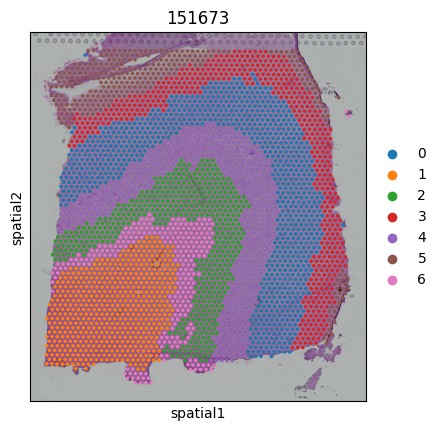
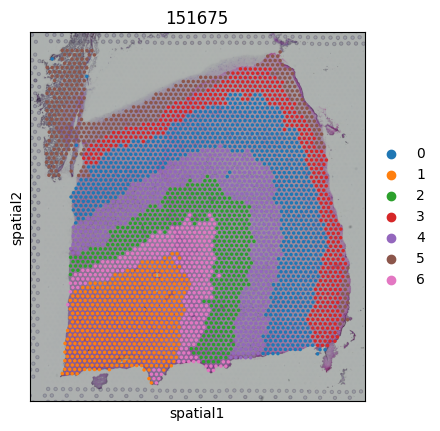
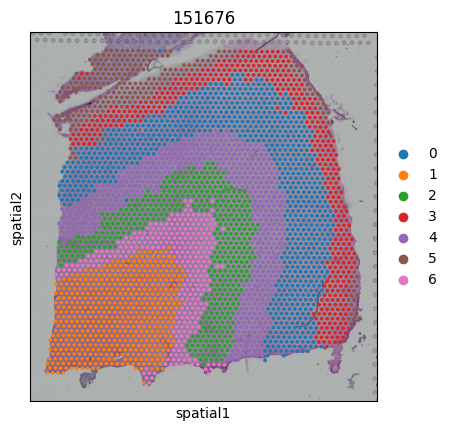
for i,adata_sub in enumerate(adata_st_list):
    pred = pred_labels[idxs[i]:idxs[i+1]]
    adata_sub.obs['Region'] = pred
    sc.pl.spatial(adata_sub,color=["Region"],title=str(slice_idx[i]))